WordPress.org

Plugin Directory

Import Meetup Events – Meetup Sync & Event Aggregator for WordPress

Import Meetup Events – Meetup Sync & Event Aggregator for WordPress

Description

Import Meetup Events lets you easily bring events from Meetup.com into your WordPress website, no API key, no authentication, and no Meetup Pro account required.

Whether you run a community site, business portal, or local meetup directory, you can start importing events instantly with just a few clicks. Focus on showcasing your events, while this plugin handles all the syncing and display effortlessly.

📄 Documentation | ⭐ Upgrade to Pro | 🛟 Get Support | 👁️ Try Admin Demo

Stop manually copying events from Meetup.com to your WordPress site. Import Meetup Events connects your Meetup groups directly to your WordPress event calendar, saving you hours every week and keeping your website always up to date.

Whether you run a local tech meetup, a nonprofit community calendar, or a multi-city event network, this plugin eliminates the double-posting problem. Import once, display everywhere.

Why 8,000+ WordPress Sites Trust Our Plugin

⏱ Save 2+ Hours Per Week
Stop the copy-paste routine. Import all your Meetup.com events with a single click, including titles, descriptions, dates, venues, and organizer details.

⚙️ Works With Your Existing Calendar
No migration required. Works as a standalone event system AND as a powerful add-on for your existing calendar plugins:

  • Easy Events Calendar — Display imported Facebook, Eventbrite, Meetup, iCal & more events in a clean calendar view on your WordPress site.
  • The Events Calendar — Supported up to the latest version 6.x. Imported events appear natively in TEC calendar views, categories, and search.
  • Events Manager — Full integration with Events Manager plugin.
  • All-in-One Event Calendar — Import and display events seamlessly.
  • EventON — Sync Meetup events into EventON.
  • Event Organiser — Compatible for imported event management.
  • My Calendar — Display imported events using My Calendar plugin.

🧱 Built-in Event Management
Don’t use a calendar plugin? No problem. Import Meetup Events includes its own lightweight event management system with shortcodes and a Gutenberg block. See Admin Demo

🚀 WHAT YOU CAN DO

✔ Import events by Meetup Event ID
✔ Import events by Meetup Group URL — Pro Version
✔ Manually import events in one click
✔ Schedule automatic imports — Pro Version
✔ Run background imports for large datasets — Pro Version
✔ Display events using shortcode, blocks, widgets, or page builders

🎯 FLEXIBLE DISPLAY OPTIONS

Display events anywhere on your website:

• 4 Modern Grid Layout Styles — Pro Version
• Shortcode support: [meetup_events]
• Filter events by Group ID — Pro Version
• Gutenberg block support — Pro Version
• Elementor widget — Pro Version
• WPBakery Page Builder element — Pro Version
• Classic WordPress widget

Example usage:

[meetup_events layout="style2"]

⚙ IMPORT FEATURES

• Manual one-click event import
• Import events by ID
• Import events by Group URL — Pro Version
• Assign categories during import
• Set event status (Publish, Draft, Pending)
• Import history logs
• Automatic scheduled imports — Pro Version
• Custom time intervals — Pro Version
• Advanced synchronization — Pro Version

💡 WHY CHOOSE IMPORT MEETUP EVENTS?

✔ Beginner friendly interface
✔ Developer friendly flexibility
✔ Lightweight & optimized
✔ Clean admin dashboard
✔ Multiple layout styles — Pro Version
✔ Page builder compatibility — Pro Version
✔ Works as standalone or add-on

Perfect for:

• Meetup organizers
• Community websites
• Event bloggers
• Business websites
• Directory portals

Importing from more than just Meetup? Check out our full event import suite:

Screenshots

  • Display events with Shortcode Layout Style 1 — Elegant grid layout to showcase your events neatly using the first style shortcode.
  • Display events with Shortcode Layout Style 2 (Pro) — Modern alternative layout for event lists, perfect for professional websites.
  • Display events with Shortcode Layout Style 3 — Clean and compact grid layout for events (Pro version).
  • Display events with Shortcode Layout Style 4 — Full-width event display with detailed info (Pro version).
  • Display events using the Gutenberg Block for WP Events — Drag and drop your events directly into posts and pages using Gutenberg (Pro version).
  • Upcoming WP Events Widget in backend (Pro) — Manage and preview upcoming events in your WordPress widget panel.
  • Preview events directly in the widget area — Quick live preview of events before placing them on your site.
  • Import event by ID — Easily import a specific Meetup event by its unique ID in one click.
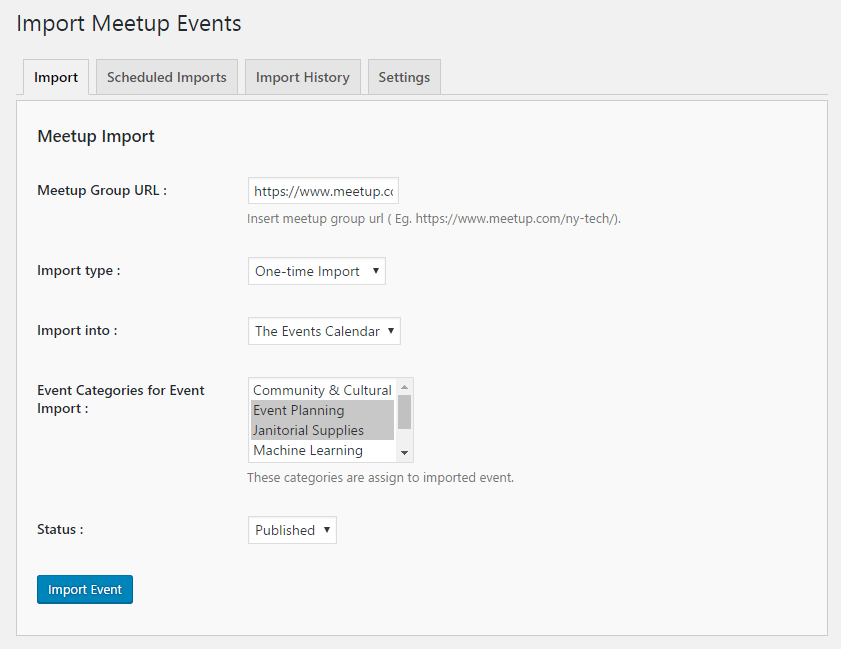
  • Import events by Group URL — Import all events from a Meetup group quickly using the group’s URL.
  • Import history logs — Keep track of all past imports, including successes, failures, and scheduled imports.
  • Plugin Settings Dashboard — Central control panel to configure your Meetup API key, import settings, and display options.
  • All Shortcodes — Use all available shortcode options to display events anywhere on your website.

Blocks

This plugin provides 1 block.

  • Meetup Events

Installation

Automatic Installation:

  1. Go to Plugins Add New.
  2. Search for “Import Meetup Events”.
  3. Click Install Now.
  4. Activate the plugin.

Manual Installation:

  1. Download the plugin from WordPress.org.
  2. Upload it to /wp-content/plugins/.
  3. Activate from the Plugins menu.

After activation:

• Go to Meetup Import menu
• Enter your Meetup API key
• Start importing events

FAQ

Can I import events without a Meetup API key?

Yes! You can import Meetup events directly without needing an API key or any authorization. There’s no requirement for a Meetup Pro account, just choose your import method and start importing instantly.

Does this plugin work with my event calendar plugin?

Yes! Import Meetup Events supports popular event plugins including The Events Calendar, Events Manager, Event Organiser, EventON, My Calendar, or you can use the built-in event system.

Does this plugin work with The Events Calendar?

Yes! It integrates seamlessly with The Events Calendar (by StellarWP), including support for the latest version 6.x. Imported events appear natively in TEC calendar views, categories, and search.

Can I import events automatically on a schedule?

Automatic scheduled imports are available in the Pro version. You can configure hourly, twice-daily, daily, or weekly sync intervals. The free version supports one-click manual imports.

What happened to the old Meetup API key method?

Meetup.com deprecated their legacy API keys in 2019 and migrated to OAuth 2.0. This plugin fully supports the new OAuth 2.0 authorization flow. See our setup guide for step-by-step instructions.

Can I display imported events anywhere on my site?

Absolutely. You can use the shortcode [meetup_events], Gutenberg block, Elementor widget, WPBakery Page Builder element, or the classic WordPress widget to display events anywhere.

Can I filter events by Group ID or layout style?

Yes! You can filter imported events by Group ID using the shortcode and display them in 4 different grid styles for a clean, modern look (Pro version).

Does this plugin import event images, venues, and organizer details?

Yes. Each import pulls the event title, description, featured image, start/end dates, venue (with address), and organizer information directly from the Meetup.com API.

Will importing events create duplicate entries?

No. The plugin checks for existing events before importing. If an event has already been imported, it will be updated instead of duplicated. This is especially powerful with the Pro version’s scheduled sync.

Is this plugin compatible with WordPress multisite?

Yes. The plugin works on both single-site and multisite WordPress installations. The Pro version includes multisite-friendly licensing for agencies.

Reviews

August 14, 2025
I was looking for a wordpress plugin to help me import my meetup events to my website I am so glad I found this plugin. It works great!Plus customer support is very responsive and helpful. Highly recommended plugin for meetup to wordpress imports and much more
May 8, 2025
The free version is fairly limited, and I’ve had some problems in the past resulting in incorrect times or duplicated entries. Still it seems to be the only plugin that does this task, and it does seem to be working correctly now, at least for Event Manager.
January 16, 2024 1 reply
The plugin works as advertised. When I ran into a problem (of my own making), I reached out to support, and they actually went in and fixed the problem FOR me!
April 24, 2024 1 reply
I’ve been using IM and IMPro with My Calendar for several years. Xylus support worked with me several times to update the plugin when Meetup changed their API. Support was courteous and prompt, staying in contact until fixed. I am now using this with the included built-in calendar instead of My Calendar. Works much better than My Calendar and the functionality is excellent. Had recent small problem and questions. Got very quick support and resolution of issue. Definitely the best Meetup aggregator!
Read all 18 reviews

Contributors & Developers

“Import Meetup Events – Meetup Sync & Event Aggregator for WordPress” is open source software. The following people have contributed to this plugin.

Contributors

Changelog

1.7.0

  • ADDED: New Events Grid View (Style 3).
  • ADDED: New Events Grid View (Style 4).
  • ADDED: Background import process for scheduled imports (Pro version).
  • ADDED: Shortcode option to display events by group ID.
  • IMPROVEMENTS: Improved security validations and input sanitization.

1.6.9

  • ADDED: Revamped admin interface with new, user-friendly GUI
  • ADDED: AJAX-based pagination support for the shortcode.
  • IMPROVEMENTS: Import events seamlessly using the new Public API integration
  • IMPROVEMENTS: Support for WP 6.9

1.6.8

  • ADDED: Integrated support for the EventPrime plugin.
  • FIXED: Authorized HTTP issue.

1.6.7

  • FIXED: Date imezone issue.

1.6.6

  • ADDED: Re-created missing schedule functionality (Pro version).
  • FIXED: date() function issue on the event details page.
  • FIXED: Resolved event import issue with The Events Calendar (TEC) plugin.
  • IMPROVEMENTS: New Meetup API Migration
  • IMPROVEMENTS: Improved security and compatibility with WordPress coding standards.
  • IMPROVEMENTS: Support for WP 6.8

1.6.5

  • IMPROVEMENTS: Text changed and Added Feedback from the header

1.6.4

  • FIXED: Update Issue in Events Manager
  • IMPROVEMENTS: Support for WP 6.7

1.6.3

  • ADDED: Copy-Paste button in the settings page.
  • IMPROVEMENTS: Support for WP 6.6

1.6.2

  • FIXED: Recurring Events Duplicate issue
  • FIXED: Schedule import bug after complete action to manually,
  • IMPROVEMENTS: Enhanced Schedule import history entry.

1.6.1

  • FIXED: Grammar Correction
  • FIXED: Plugin Deletion Bug
  • IMPROVEMENTS: Support for PHP 8.3

1.6.0

  • FIXED: Javascript Exceptions.
  • FIXED: Delete WP Cron multiple queue when you delete schedule delete.(PRO)
  • IMPROVEMENTS: EventOn Event Metadata.
  • IMPROVEMENTS: Added Support for PHP 8.2 and some design and security fixes
  • IMPROVEMENTS: Support for WP 6.4

1.5.9

  • FIXED: Google Map Iframe Bug

1.5.8

  • ADDED: Skip Trashed Events Option
  • ADDED: Google Map API key Option
  • ADDED: Supported plugin Hook
  • ADDED: Responsive grid view style 1 support
  • ADDED: Time Format support in grid view style 2 (PRO)
  • ADDED: Minimum Pro version notice
  • FIXED: Event Metadata Save/Update Bug
  • IMPROVEMENTS: Security and GUI changes

1.5.7

  • IMPROVEMENTS: Gutenberg Block
  • IMPROVEMENTS: Support for WP 6.2

1.5.6

  • ADDED: Events Grid List New Layout ( PRO )
  • ADDED: Upcoming Events Elementor Widget ( PRO )
  • ADDED: Element for Visual Composer ( WPBackery Page Builder)
  • ADDED: Admin Submenu Schedule Import, Import History, etc..
  • ADDED: Schedule import Source Data Link.
  • FIXED: Duplicate Event issue in TEC.
  • IMPROVEMENTS: PHPCS Improvements.
  • IMPROVEMENTS: Support for PHP 8

1.5.5

  • ADDED: Compatibility with The Events Calendar 6.0
  • FIXED: Parsedown class conflict issue.

1.5.4

  • ADDED: Compatibility with The Events Calendar 6.0

1.5.3

  • ADDED: Converted the Event Description Markup to Html import.
  • ADDED: Support for don’t update status & category during auto-update. (Pro)
  • ADDED: Event source link field in create/edit event.
  • FIXED: Duplicate Event issue in My Calendar.
  • IMPROVEMENTS: Support for WP 6.0

1.5.2

  • ADDED: Shortcode page for help
  • ADDED: Import history delete button for clear import history
  • FIXED: Placeholder image url not working
  • FIXED: OAuth key and secret link issue
  • FIXED: Authorization object related error

1.5.1

  • ADDED: Support and Docs link in plugin page
  • ADDED: Additional classes support in meetup block
  • FIXED: Undefined schedule group name issue

1.5.0

  • ADDED: GraphQL Support
  • ADDED: Considered private status in event already exists check
  • IMPROVEMENTS: Support for WP 5.9

1.4.4

  • ADDED: Optional Plugin deactivation Feedback
  • FIXED: Google map iframe embed error.
  • FIXED: Some translation string
  • IMPROVEMENTS: Made placehold.it load over https
  • IMPROVEMENTS: Support for WP 5.6

1.4.3

  • FIXED: jQuery 3.0 Error

1.4.2

  • ADDED: EM timezone support.
  • ADDED: Option for Direct Event link to Meetup.
  • ADDED: Option for author.
  • ADDED: Option for time format.
  • ADDED: Option for event slug.
  • ADDED: Accent Color Functionality
  • IMPROVEMENT: New design for Support and help page.
  • FIXED: Event get removed before it happens (for some timezones)

1.4.1

  • ADDED: Support for Meetup OAuth 2.0 Authorization.
  • IMPROVEMENT: Some Improvements
  • FIXED: some bug fixes.

1.4.0

  • ADDED: Support for WP 5.0
  • ADDED: Meetup Events Gutenberg block.
  • ADDED: more options in shortcode full shortcode is now like. [meetup_events col=”2″ posts_per_page=”12″ category=”cat1,cat2″ past_events=”yes” order=”desc” orderby=”post_title” start_date=”2017-12-25″ end_date=”2018-12-25″ ]
  • ADDED: Merged Pro & Free codebase, Introduced Pro as an add-on
  • IMPROVEMENT: Some Improvements
  • FIXED: some bug fixes.

1.3.0

  • ADDED: Featured Image import support
  • IMPROVEMENT: Some Improvements
  • FIXED: some bug fixes.

1.2.1

  • IMPROVEMENT: Some Improvements
  • FIXED: some bug fixes.

1.2.0

  • ADDED: Upcoming Facebook Events Widget (Pro)
  • ADDED: Advanced sync option in Import Meetup Events. (Pro)
  • ADDED: option in shortcode for eventlist “category,col”
  • IMPROVEMENTS: make date multilingual
  • IMPROVEMENTS: in event archive and single event details page.
  • FIXED: some bug fixes in ai1ec events import.
  • FIXED: jQuery UI css conflict with DIVI theme
  • FIXED: some bug fixes.

1.1.1

  • FIXED: some bug fixes in events manage.

1.1.0

  • Added: in-built Event management system.
  • Added: Import into My Calendar
  • Added: Import into eventON
  • Added: import into All-in-One Event Calendar
  • Added: import into Event Organizer
  • Added: Import history
  • Added: support links.
  • Improvements in scheduled imports
  • Fixes: some bug fixes

1.0.0

  • Initial Version.