

Description
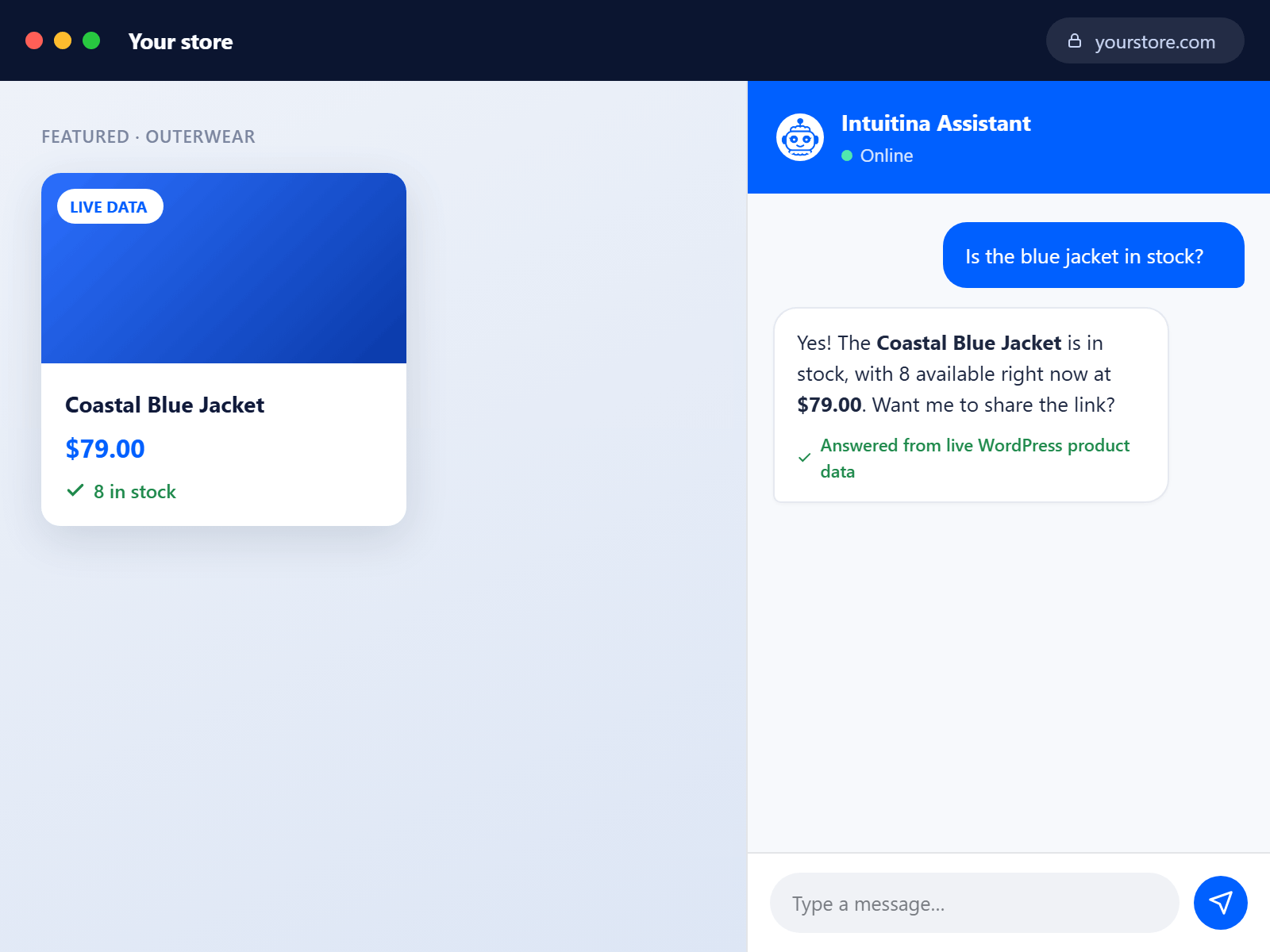
This WordPress plugin offers a fully managed AI chatbot service. The key offering is: “Turn your WordPress website into an always-available source of answers with Intuitina.”
Core Features
The chatbot operates in two primary modes:
Lead Generation: Proactively engages visitors through welcome messages, follow-up questions, and directing traffic to conversion pages.
Customer Support: Functions as a 24/7 help desk, answering FAQs and “reducing repetitive support requests and improve response times.”
Key Differentiators
- No external AI subscriptions needed (OpenAI, ChatGPT, Claude, or Gemini accounts unnecessary)
- “Fully managed AI assistant: The Intuitina team helps with setup, configuration, training, and ongoing optimization”
- Draws responses from your WordPress content
- Supports 120+ languages
- 90-day free trial available
Technical Capabilities
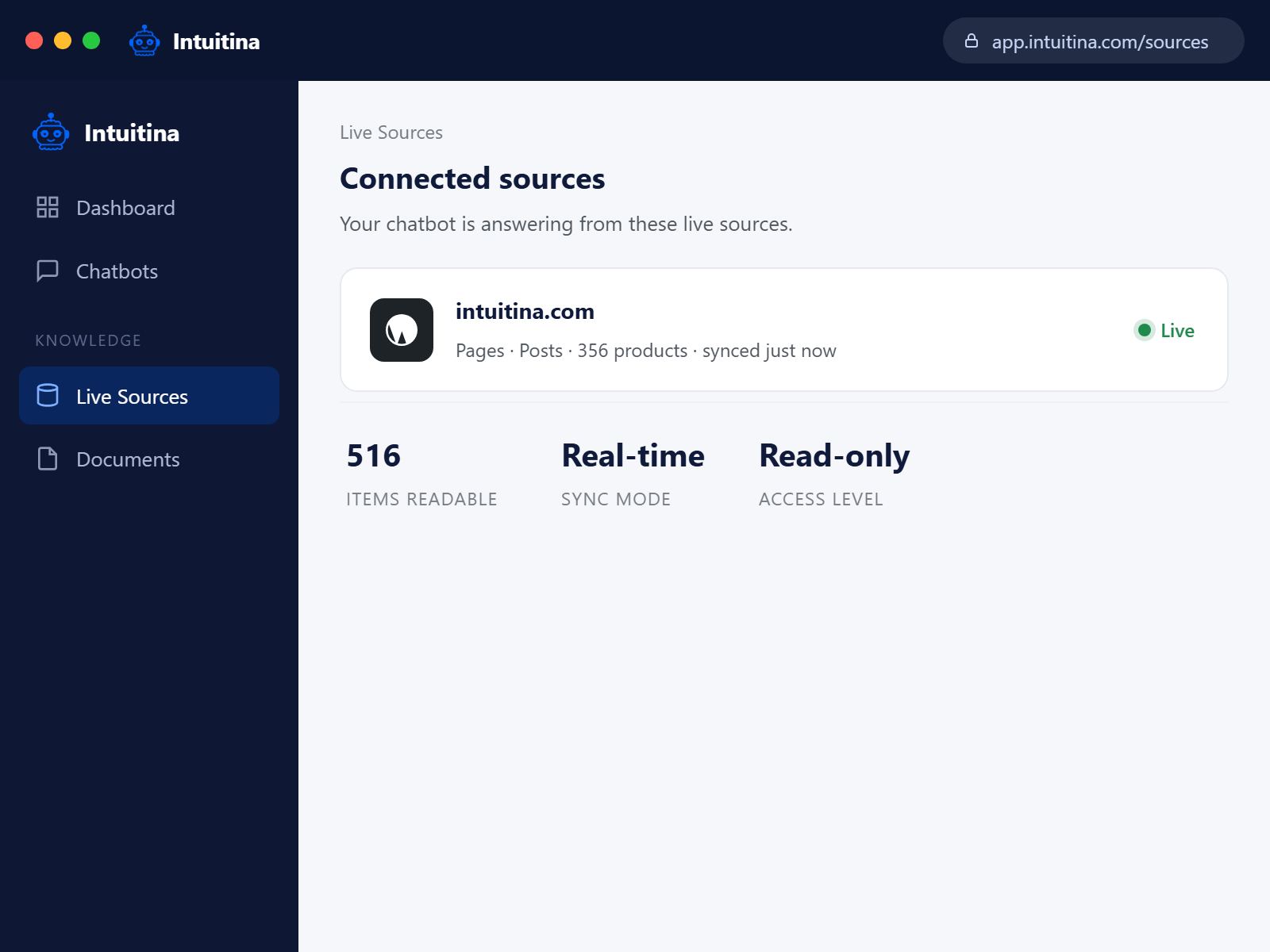
- Accesses published pages, posts, WooCommerce products, and order information
- Works without WooCommerce on standard WordPress sites
- Connector is “designed to be lightweight” with minimal performance impact
Security
“Only an administrator can authorize the connection” and users retain control over which content types are accessible.
Screenshots
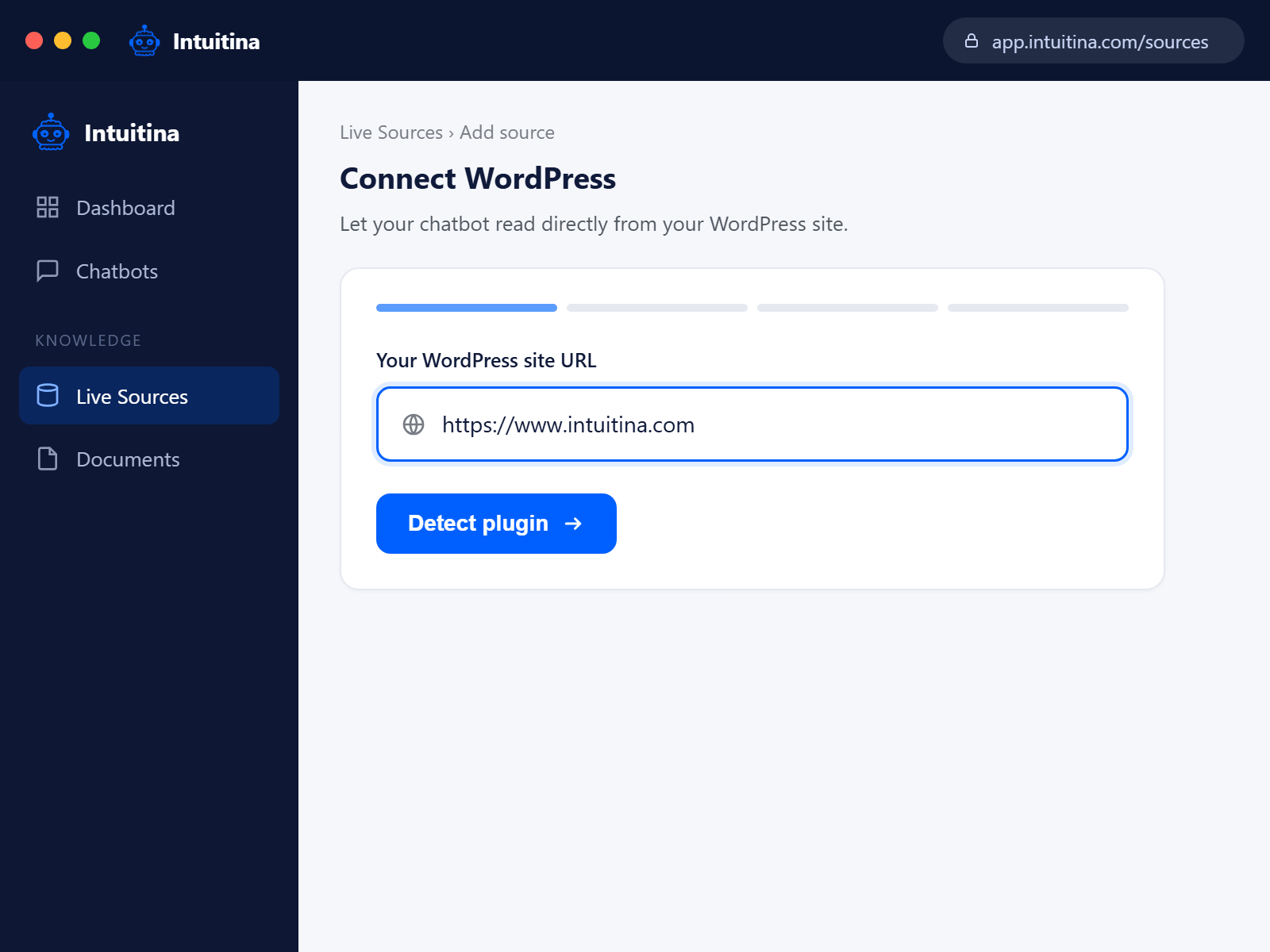
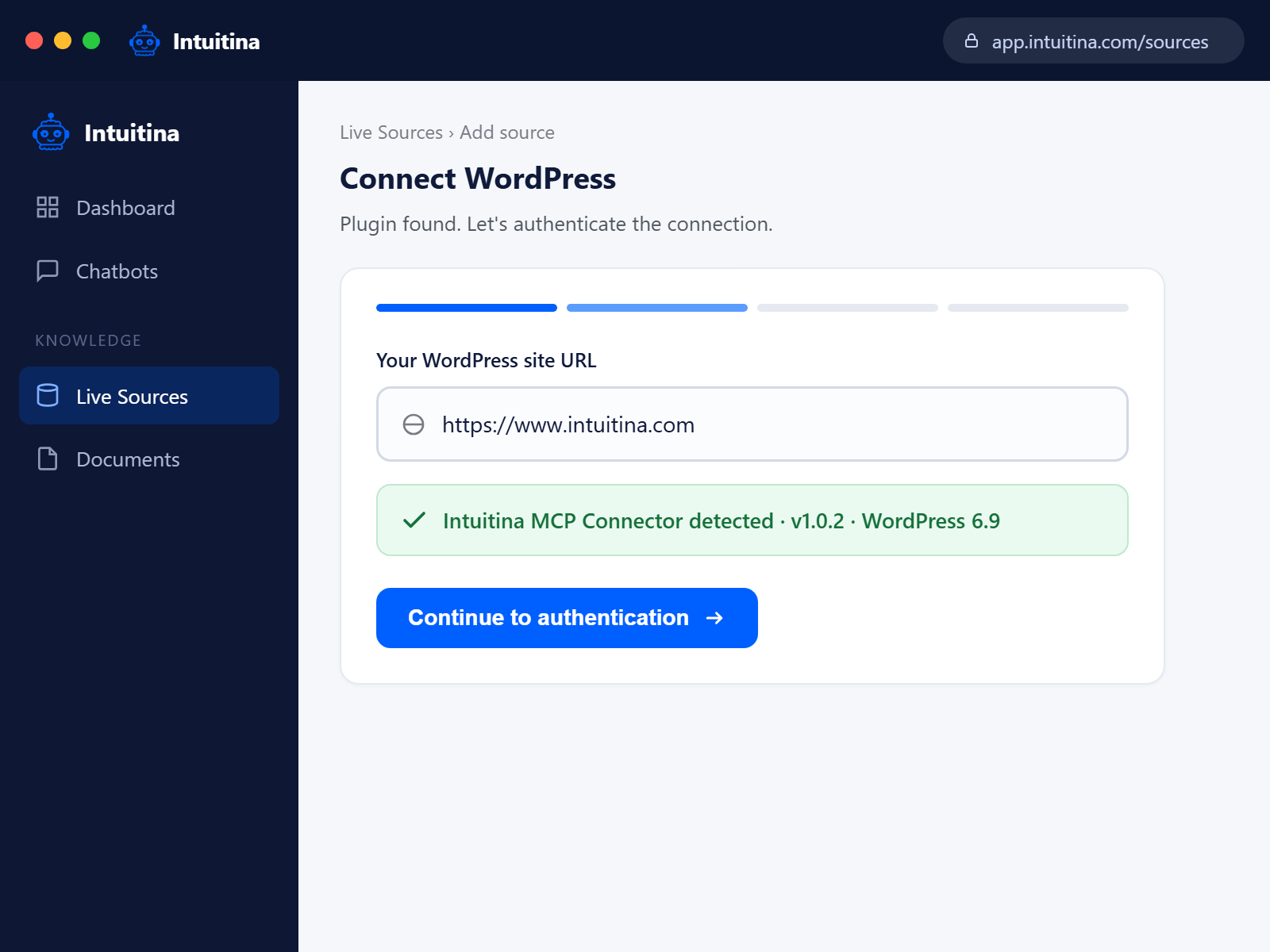
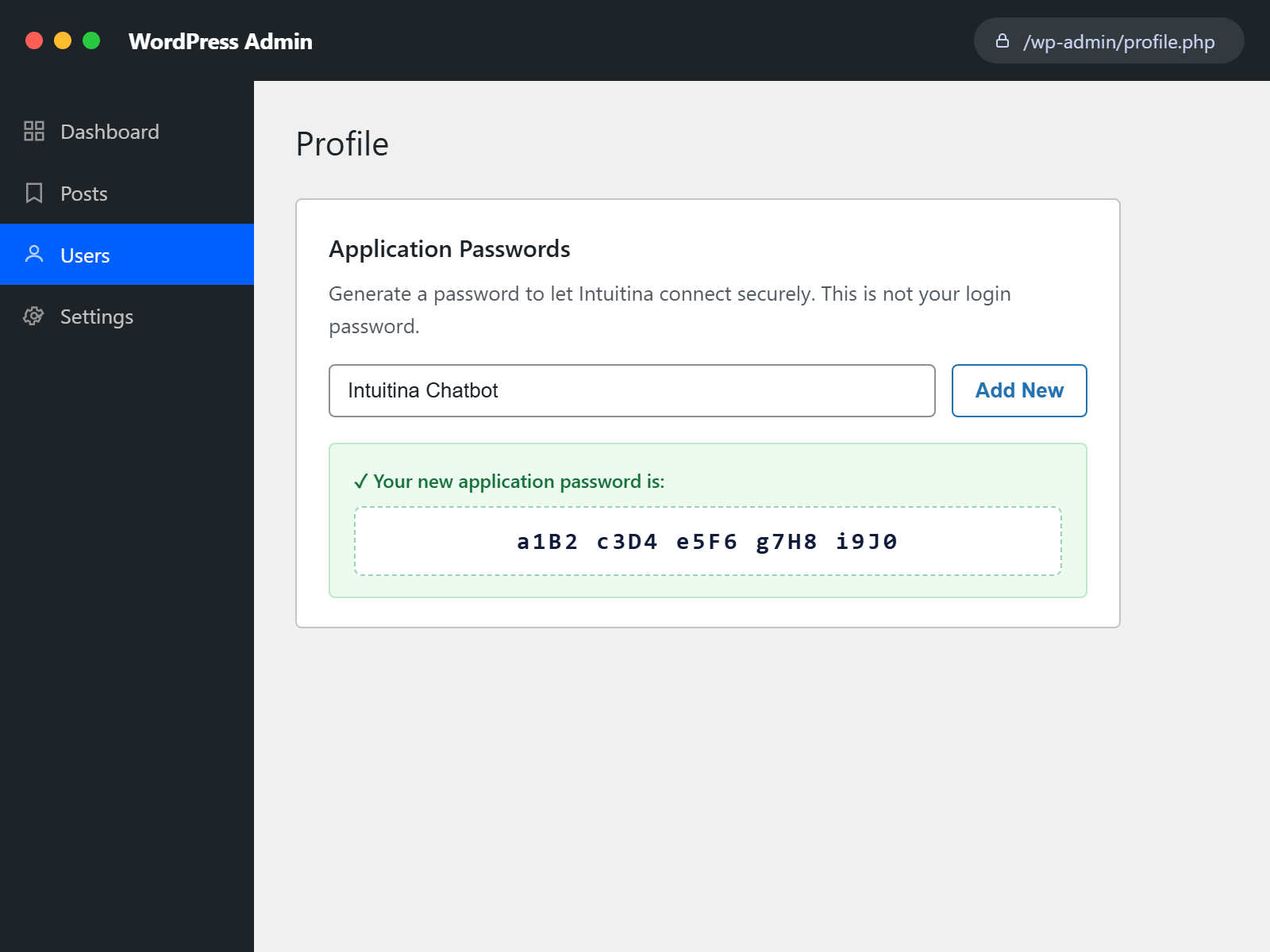
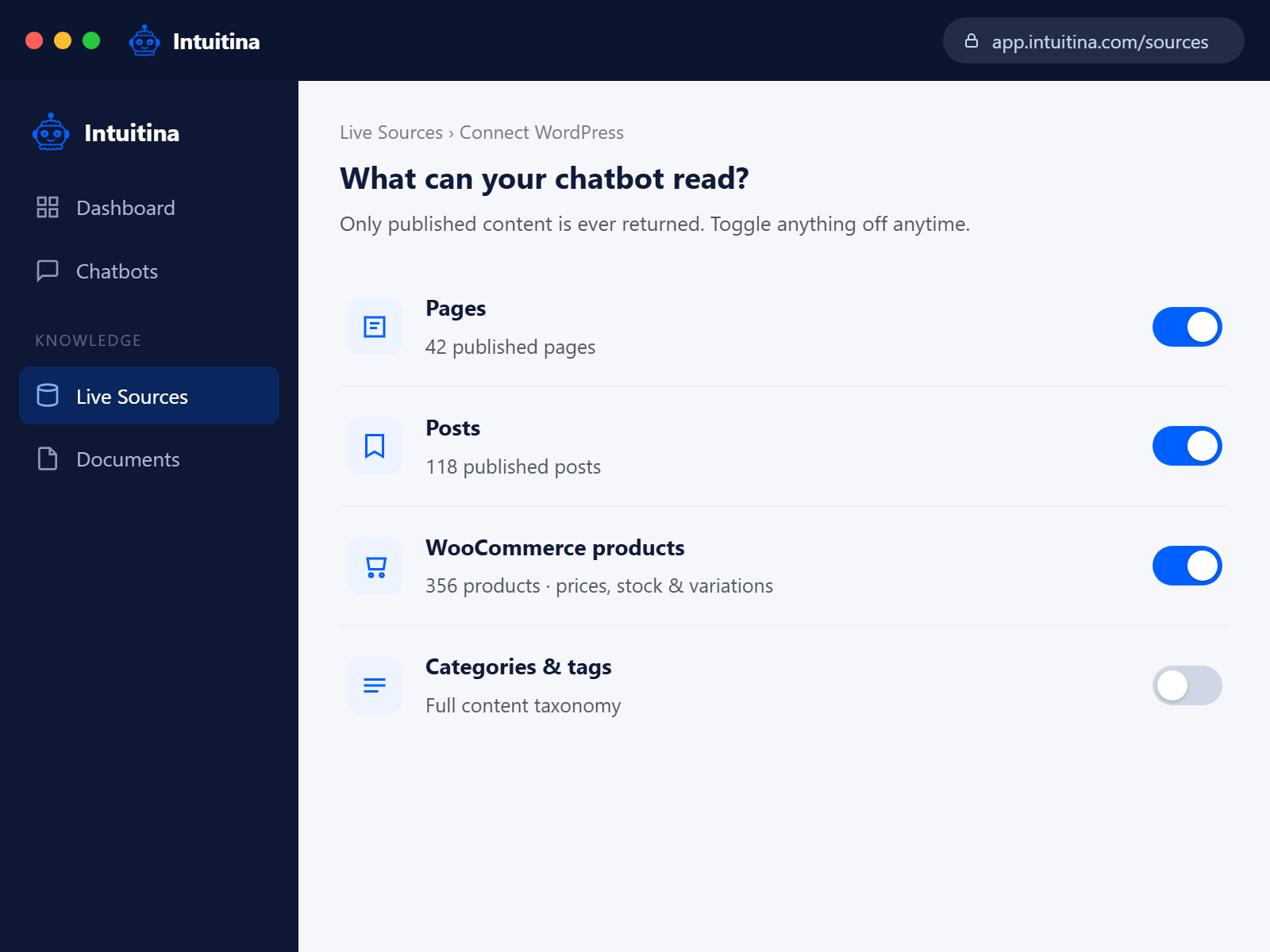
Installation
From the WordPress Plugin Directory (recommended)
- In your WordPress admin, go to Plugins -> Add New.
- Search for Intuitina AI Chatbot: Live WordPress Content Connector.
- Click Install Now, then Activate.
- Go to your Intuitina dashboard and follow the Connect WordPress wizard.
Manual installation
- Download the plugin zip from your Intuitina dashboard.
- Go to Plugins -> Add New -> Upload Plugin.
- Choose the zip file, click Install Now, then Activate.
FAQ
-
Do I need any other plugins?
-
No. This plugin is completely self-contained. No other plugins are required.
-
Does this work without WooCommerce?
-
Yes. WooCommerce support is optional – the plugin automatically detects whether WooCommerce is active and only exposes product data if it is.
-
Is my content safe?
-
Yes. The plugin only exposes content that is already publicly visible on your site. All access requires a valid WordPress Application Password created by an administrator – it cannot be accessed anonymously.
-
Will this slow down my site?
-
No. The plugin only responds when your Intuitina chatbot makes a request. There is no background processing, no scheduled tasks, and no impact on your site’s frontend performance.
-
What WordPress version do I need?
-
WordPress 6.0 or higher.
-
Where do I get an Intuitina account?
-
Visit intuitina.com to get started.
Reviews

Contributors & Developers
“Intuitina AI Chatbot: Live WordPress Content Connector” is open source software. The following people have contributed to this plugin.
Contributors

Translate “Intuitina AI Chatbot: Live WordPress Content Connector” into your language.
Interested in development?
Browse the code, check out the SVN repository, or subscribe to the development log by RSS.
Changelog
1.9.2
- Fixed the admin page getting permanently stuck showing the 3-step setup wizard even after the chatbot was genuinely connected and working. Root cause: the endpoint accepts two auth methods (a plugin-generated Connection Token, or a WordPress Application Password), but only the Connection Token path was marking the site as “connected” – sites authenticating via Application Password (the method the live chatbot backend actually uses) never got their “last used” timestamp recorded, so the admin page could never advance past “Choose what your chatbot can see” to the “Setup complete” screen no matter how long it had actually been working. Both auth paths now record the connection correctly.
1.9.1
- Simplified the “your content is fully searchable” ready message – removed the second line (“Every page and post is ready to be found and answered from.”) and put the full stop on the main line instead, so it reads as one clean sentence rather than two.
1.9.0
- Removed all temporary diagnostic endpoints and debug fields added while tracking down the indexing issues fixed in 1.8.5-1.8.8 (the stuck-posts inspector, the refresh-click marker, the extra fields on the progress response). No functional change – the underlying fixes all stay in place – this just cleans the code back down to only what’s needed going forward.
1.8.8
- The “backfill complete” flag is no longer trusted blindly – it’s now cross-checked against the real indexed count every time, and automatically cleared and retried if they don’t match. Sites that got stuck at a partial percentage from an earlier version’s race condition (fixed in 1.8.7) needed a manual “Refresh content index” click to recover; this makes that recovery automatic on the very next page load, no manual step required. Verified locally: a site falsely marked complete at 90/138 self-corrected to 138/138 with no user action.
1.8.7
- Found and fixed the real reason indexing could still stall on a realistic-sized site: the “only one batch at a time” rate limit was a fixed 3-second timer, but a real batch measured at 4.16 seconds – longer than the timer itself. That let overlapping concurrent batch runs slip through, and a race between them could cause one to wrongly conclude indexing was already complete. Replaced the timer with an actual lock (atomic acquire via add_option(), released when the batch finishes, with a 60-second stale-lock safety net in case a request dies mid-run) – verified locally that concurrent runs are now correctly blocked while one is in progress.
1.8.6
- Fixed the live progress indicator appearing frozen under slow/throttled network conditions. The poll request’s URL was identical on every tick (same action, same nonce), so a browser could legally serve a cached response instead of hitting the server – more likely to happen when the network is slow and the browser prefers a cached answer over waiting. Added a cache-busting parameter,
cache: 'no-store'on the fetch, and explicit no-cache response headers server-side, so every poll is now guaranteed to reflect live state.
1.8.5
- Found and fixed the specific reason 3 posts stayed permanently un-indexed on a real WooCommerce site: the site’s own Shop/Cart/Checkout pages use WooCommerce Blocks, which fatal (“Call to undefined function …wc_get_notices()”) when rendered outside a real front-end cart/session context – exactly what indexing does. These pages don’t have meaningful static content to index anyway (WooCommerce generates them dynamically at real page-view time), so indexing now detects and skips the risky render for WooCommerce’s own special pages, keeping the fast fallback text for them instead.
- The render-failure log is now cleared on “Refresh content index” so old entries from a previous version’s behavior can’t be mistaken for a current problem.
1.8.4
- Found the real reason indexing could get permanently stuck (1.8.3’s timeout theory was disproven – a manual synchronous run completed 35 remaining posts in 1.4 seconds with no hang at all). The actual cause: wp_cron’s async self-request, which normally re-triggers each follow-up batch, simply never fired again on a real affected site. Indexing no longer depends on wp_cron alone – a batch also now runs inline on every wp-admin page load and on every admin-ajax.php request (which includes the live progress-polling call already firing every few seconds while the settings page is open), so it keeps moving forward reliably regardless of whether wp_cron itself is working on a given host.
1.8.3
- Fixed indexing progress getting permanently stuck partway through (confirmed on a real site: stopped dead at 4 of 39 and never advanced, even across many retries). Root cause: a slow/hanging page-builder shortcode on one specific post could hit PHP’s execution time limit while rendering it for the index – a timeout, not a catchable error, so the 1.7.3 try/catch didn’t cover it. Worse, every retry re-selects posts in the same order, so it died on the exact same post every single time. Fixed by writing a fast fallback index entry for each post BEFORE attempting the (potentially slow) full render, so even if the render hangs, the post is already marked done and can never block the batch again.
1.8.2
- “Refresh content index” now does a genuine full rebuild – it clears every existing index entry before restarting, instead of only filling in gaps for content that was never indexed. Previously, clicking it on an already-fully-indexed site would find nothing to do and silently stay on “ready,” which didn’t match what “Refresh” implies (and meant stale entries – e.g. after a theme/shortcode change altered how a page renders – never actually got regenerated).
1.8.1
- Added an estimated time remaining (“about 3 minutes left”) next to the percentage on the content-readiness indicator, based on the known backfill batch size/interval. Rounded to whole minutes/hours rather than showing false precision, since actual batch timing can vary with host speed and content size.
1.8.0
- Redesigned the content-readiness indicator that was hidden in 1.7.9. Replaced the old technical “Search index” panel (raw counts, prominent “Rebuild” button) with a quiet status tile – “Getting your content ready” while indexing, “Your content is fully searchable” once done – that reads as part of the product rather than a developer tool. The manual refresh action is now a de-emphasized text link (“Not seeing the right answers? Refresh content index”), matching how “Get a new code” is presented elsewhere on the same screen. Live progress updates (no page reload needed) still work the same way underneath.
1.7.9
- Hid the “Search index” card (rebuild button + progress bar) from the settings page. Indexing itself is unchanged – it still runs automatically in the background – this just removes the customer-facing controls for now.
1.7.8
- 1.7.7 only converted the rendered-text index’s own search to raw SQL; the native title/content search pass still used WP_Query and was proven (via direct A/B testing – identical code, clean WordPress install vs. the affected production site) to still be vulnerable to the same
pre_get_postsinterference. Search is now raw SQL end-to-end – both the native pass and the index fallback – so nothing on any host’s stack can intercept it. Verified against a real local WordPress + MySQL install before release, not just in isolation.
1.7.7
- Found and fixed the actual root cause of intermittent zero-result searches on some hosts. Our own rendered-text index fallback used
WP_Query, which – despitesuppress_filters– is still subject topre_get_posts, a hook that fires unconditionally on every query and that some security plugins/host-provided must-use plugins use to alter query behavior site-wide. On at least one customer site this silently zeroed out otherwise-correct matches. The fallback now queries the database directly via a parameterized SQL statement, with no hook surface at all, verified against a real WordPress install to behave identically to the old code for normal cases while being immune to this class of interference.
1.7.5
- No code changes over 1.7.4 – re-published after confirming, on a host running an aggressive PHP OPcache (WP Engine), that plugin file updates can silently fail to take effect until the site’s full cache is purged, even though the Plugins list correctly shows the new version number. If search results seem to lag behind a plugin update, purge your host’s full cache (not just page cache) after updating.
1.7.4
- Guaranteed live search, on every host. Search queries now run with
suppress_filtersand caching disabled, so a host-level search-replacement service (e.g. an Elasticsearch-backed search add-on) or a persistent object cache can no longer silently swap in its own, potentially out-of-date results. Search always reads directly from the site’s live database now, matching the plugin’s core promise.
1.7.3
- Fixed a double “%%” showing in the live progress label (the JS-side template used PHP’s printf escaping, which plain JS string replacement never un-escapes).
- Fixed the indexing backfill being able to get permanently stuck if rendering a single page/post’s content threw an error (e.g. a page-builder shortcode that assumes front-end-only context) – that post’s error is now caught, a raw-text fallback is indexed instead of blocking, and a stale “running” lock (from a batch that died before this fix) now self-heals after 10 minutes. The “Rebuild search index” button also now always forces a fresh start rather than deferring to a possibly-stuck lock.
1.7.2
- Live-updating search index progress. The “Rebuild search index” card now refreshes its progress bar automatically every few seconds while indexing runs in the background, instead of only updating when the page is reloaded.
1.7.1
- Fixed the search-index progress card’s styling not applying (CSS cache-busting version wasn’t bumped alongside a style-only change in 1.7.0).
1.7.0
- Better search on page-builder sites. Search and snippets now also check a plain-text copy of each page/post rendered the same way WordPress displays it, so content built with WPBakery/Visual Composer (or other builders that nest real text inside shortcode attributes, or encode it entirely) can actually be found — not just content stored as plain text. Existing content is indexed automatically in the background after updating; a “Rebuild search index” button is also available in the plugin settings for manual re-runs (e.g. after a bulk import).
1.6.3
- “Where is my order?” now works without an order number. New
list_orders_for_emailtool returns the customer’s recent orders (up to 5) so the chatbot can either answer directly when there’s only one, or offer a short pick-list when there are several. Still privacy-safe — results are filtered by billing email, so it cannot be used to see other customers’ orders.
1.6.2
- Order status lookups in the chatbot. New
get_ordertool: when a customer asks something like “has order #4970 been dispatched?”, the chatbot can now look up the order and answer with status, shipping method, and date placed. Privacy-safe by design — the tool requires BOTH the order number AND the email the customer used at checkout, and returns “not found” if the email does not match. That means an order number alone cannot be used to enumerate other customers’ orders. Requires WooCommerce.
1.6.1
- Product images in chatbot answers. WooCommerce product search results now include the featured image URL, so the chatbot can show the product photo alongside price and stock — not just describe it in words.
1.6.0
- Live connection status on the admin home page. Once your chatbot has actually reached the site, the plugin’s home page switches to a “You’re all set” completion screen showing the last request timestamp (“Last request was 3 minutes ago”), and the Intuitina menu in the WordPress sidebar shows a green pulse dot whenever the chatbot is actively connected. Before that first successful request, the home page shows a “waiting for the chatbot to connect” state so it’s clear whether the connection is still pending.
- Safer connection-code regeneration. The “Get a new code” button now asks for confirmation before regenerating — an accidental click can’t silently disconnect a working chatbot anymore.
- Auto-copy with a fallback. Generating a connection code copies it to the clipboard for you; a visible “Copy again” button still works if the browser blocks the automatic copy.
1.5.1
- Suppress foreign admin notices on the plugin’s own setup page. Other plugins that inject warning banners into every WordPress admin page (jQuery Migrate Helper, various security scanners, etc.) no longer break the setup flow. Notices remain fully visible on every other admin page.
1.5.0
- Redesigned admin UI. Replaced the old 4-tab admin (Overview / Connection / Content Access / Help) with a linear, wizard-style setup flow: Welcome > Ready > Choose Content > Setup Complete. One clear action per screen, progress markers turn green as you finish each step, and the whole page is written in plain language (“connection code” instead of “connection token”). Advanced options (Application Password, REST endpoint URL, diagnostics, plugin reset) live behind an “Advanced” tab so first-time users are never distracted by them.
1.4.1
- Guaranteed-fresh reads. The REST handler now calls
wp_suspend_cache_addition( true )so no lingering object-cache state can ever stale a product / post / page edit that was just saved. Every chatbot request reads the current database state.
1.4.0
- New tools:
searchandfetch. Unified Q&A pair matching the ChatGPT MCP compatibility schema.search(query)returns matching pages/posts/products from a single call, with live price, sale price, on-sale flag and stock status inline for each product result — so a chatbot can answer “what’s the price of ABC?” in one round-trip instead of two. - Freshness guarantees for WooCommerce. REST responses now emit
Cache-Control: no-store(via WP core’snocache_headers()), so no CDN or caching plugin can serve stale product data. New, renamed, repriced, or trashed products reach the chatbot immediately — no re-index required. - Hidden products stay hidden. Product queries now filter by WC visibility so items with “Catalog visibility: Hidden” no longer leak into chatbot answers.
1.3.1
- Complete admin page redesign. Introduced a proper design system with sidebar navigation (Overview / Connection / What’s exposed / Help), external CSS/JS assets, and consistent card-based components matching modern WordPress admin standards.
- Added one-click copy button on newly generated Connection Tokens.
- FAQ now uses native collapsible sections.
1.3.0
- New: Connection Token authentication as an alternative to Application Passwords. Generated from the plugin’s admin page; sent as
Authorization: Bearer <token>. Works on sites where Application Passwords are blocked by security plugins (Solid Security, Wordfence, All In One WP Security), magic-link login systems, WP Engine SSO, or hosts that strip the Basic Authorization header. - Token is stored as a SHA-256 hash – the plaintext value is shown only once at generation time.
- Admin page shows token status, creation date, and last-used timestamp. One-click revoke or regenerate.
- Both auth methods (Bearer and Basic) remain supported; the endpoint accepts either.
- Constant-time hash comparison via
hash_equalsprevents timing attacks.
1.2.8
- Added a top-level “Intuitina” menu in the WordPress admin sidebar for easy discovery, with a custom robot icon.
- Added a Dashboard widget showing plugin status, WooCommerce detection, and quick action buttons.
- Moved the Getting Started page from Settings -> Intuitina Connector to the new top-level Intuitina menu.
1.2.7
- Added a Getting Started admin page (Settings -> Intuitina Connector) with setup steps, live status, FAQ, and links to Application Password creation and the Intuitina dashboard.
- Added a one-time “Plugin activated” admin notice with a Get Started button.
- Added a “Get Started” quick link on the Plugins list row.
- Guidance covers common security-plugin blockers (Wordfence, Solid Security, All In One WP Security).
1.2.5
- Rebranded plugin listing to Intuitina AI Chatbot: Live WordPress Content Connector to better reflect what the plugin does.
- Rewritten description, “What your chatbot can read”, “Why this matters”, and “How it works” sections in line with the Intuitina product page.
- Added Plugin URI pointing to the dedicated Intuitina product page.
- Added Pulse Software Solutions LLC as a contributor.
1.2.4
- Maintenance release – no functional changes.
1.2.3
- Plugin header re-aligned to the exact format from the WordPress.org Plugin Header Requirements documentation. Functionally identical to 1.2.2.
1.2.2
- Internationalization: wrapped remaining JSON-RPC error strings in
__()calls. - Added translation template (
languages/intuitina-mcp-connector.pot). - Plugin header format aligned with the WordPress.org docs example for parser compatibility.
1.2.1
- Security: tightened the REST endpoint permission_callback to require the
manage_optionscapability (Administrator). Previouslyedit_postswas used, which is also held by Authors and Contributors – too permissive for an endpoint that exposes site-wide content and WooCommerce data to an external service. - Returns a proper WP_Error (401 / 403) instead of a boolean so REST API clients receive a meaningful error response.
1.2.0
- Self-contained – no additional plugins required.
- REST endpoint registered at
intuitina/v1/mcp(versioned, conflict-free). - Added proper input sanitization and pagination limits throughout.
- Added activation check for minimum WordPress version.
- Only published content is exposed – drafts and private posts are never returned.
- Removed all third-party class dependencies.
1.0.0
- Initial release.
- Read-only access to posts, pages, taxonomies, and WooCommerce products.