

Description
Try AI on your website in under 60 seconds — no API key required.
See real answers from your own content. No setup, no configuration, no credit card.
Promptor turns your WordPress site into an AI-powered sales assistant that answers questions, recommends services, and captures leads — all based on your actual content.
Unlike generic chatbots, Promptor reads your pages and posts. It knows what you offer, speaks in your context, and helps visitors take the next step.
Live Demo
See Promptor in action:
https://promptorai.com/demo
Experience how the AI answers real questions, recommends services, and captures leads.
See it working instantly
- Activate the plugin and start the free trial (no API key needed)
- Select up to 2 pages to train the AI on
- Ask a question and see a real answer from your own content
That’s it. No sign-ups. No configuration. No credit card.
What Promptor does for your business
- Answers visitor questions 24/7 — based on your actual pages, posts, and services
- Captures leads inside the chat — visitors share their details naturally during conversation
- Turns visitors into leads — guide users toward booking, inquiry, or purchase
- Responds in the visitor’s language — the AI automatically matches the language of the question
Who is Promptor for?
- Service businesses that lose leads to slow response times
- Founders who need to qualify leads outside business hours
- Local businesses that want to answer common questions automatically
- Agencies adding AI-powered engagement to client websites
- WooCommerce stores recommending products through conversation (Pro)
Free Features
- No API Key Trial — Start instantly with 10 free AI queries, no OpenAI account needed
- Mini Knowledge Base — Train AI on up to 2 pages during trial, 3 with your own API key
- Suggested Questions — Onboarding generates sample questions so you see results immediately
- Real Content Answers — AI responds based on your actual pages, not generic training
- Lead Capture — Collect visitor contact information directly inside the chat
- Lead Inbox — View recent inquiries in the WordPress admin
- AI Cost Guardrails — Set daily and monthly spending limits with automatic model fallback
- Shortcode Widget — Place
[promptor_search]anywhere on your site - Quick Start Wizard — Step-by-step onboarding gets you running in minutes
- Dark Mode — Dark, Light, or Auto theme for the admin interface
- Brand Customization — Adjust colors, heading, and subtitle to match your site
How It Works
Step 1: Start the trial or connect your API key
Activate the plugin and choose: try instantly with 10 free queries, or enter your OpenAI API key for unlimited use.
Step 2: Select pages to train on
Pick the pages that describe your business. The AI reads them and uses the content to answer visitor questions accurately.
Step 3: Add the widget to your site
Place the [promptor_search] shortcode on any page. Visitors start asking questions and the AI responds based on your content.
Upgrade to Pro
The free version is fully functional. Pro removes limits and adds tools for scaling:
- Unlimited Knowledge Base — Train AI on all your pages, posts, products, and PDFs
- Website Crawler — Automatically index your entire site
- Popup Widget — Floating chat button on every page
- WooCommerce Integration — Product recommendations, add-to-cart, inventory awareness
- Analytics Dashboard — Track queries, leads, conversion rates, and revenue
- AI Lead Scoring — Automatically classify leads as Hot, Warm, or Cold
- Email and Slack Alerts — Get notified when new leads arrive
- Webhooks — Connect to Zapier, Make, or custom automation
- White Label — Remove “Powered by Promptor” branding
Privacy and Data Handling
OpenAI API:
When using your own API key, user queries and selected content are sent to OpenAI to generate responses. During the free trial, queries are routed through a Promptor-managed proxy that uses OpenAI on your behalf. Review OpenAI’s Terms of Use and Privacy Policy.
Telemetry (Optional):
The free version includes optional anonymous telemetry to help improve the plugin. It is disabled by default and requires explicit opt-in. When enabled, only aggregate statistics are collected (setup progress, KB counts, query totals). No personally identifiable information is ever collected. See our Privacy Policy.
External Services
This plugin connects to external services to provide its functionality.
1. OpenAI API
- Purpose: Generate AI chat responses and semantic embeddings
- Data Sent: User queries, selected page content, API key (when using your own key)
- When: Every chat interaction and knowledge base sync
- Terms: OpenAI Terms of Use
- Privacy: OpenAI Privacy Policy
2. Promptor Trial Service (Free Trial Only)
- Purpose: Provide AI responses during the free trial without requiring an API key
- Data Sent: User queries and selected page content (routed through a managed proxy)
- When: During trial chat interactions only
- Privacy: Promptor Privacy Policy
3. Promptor Telemetry API (Optional, Disabled by Default)
- Purpose: Collect anonymous usage statistics to improve the free version
- Data Sent: Setup status, KB counts, query/lead totals (numbers only), plugin/WP/PHP versions, anonymous UUID
- Data NOT Sent: Site URLs, IP addresses, emails, content, queries, or any PII
- When: Twice daily via WP-Cron, only when explicitly enabled
- Control: Enable/disable anytime in Settings > Telemetry
- Privacy: Promptor Privacy Policy
Screenshots

No API Key Trial — Start using AI instantly without any setup or API key 
AI Chat Widget — Interactive chat that answers questions from your content 
Lead Capture Inside Chat — Collect contact information directly in conversation 
Quick Start Wizard — Choose trial or API key, select pages, and start chatting 
Knowledge Base Selection — Pick which pages train your AI assistant 
Lead Inbox — View inquiries and captured leads in WordPress admin 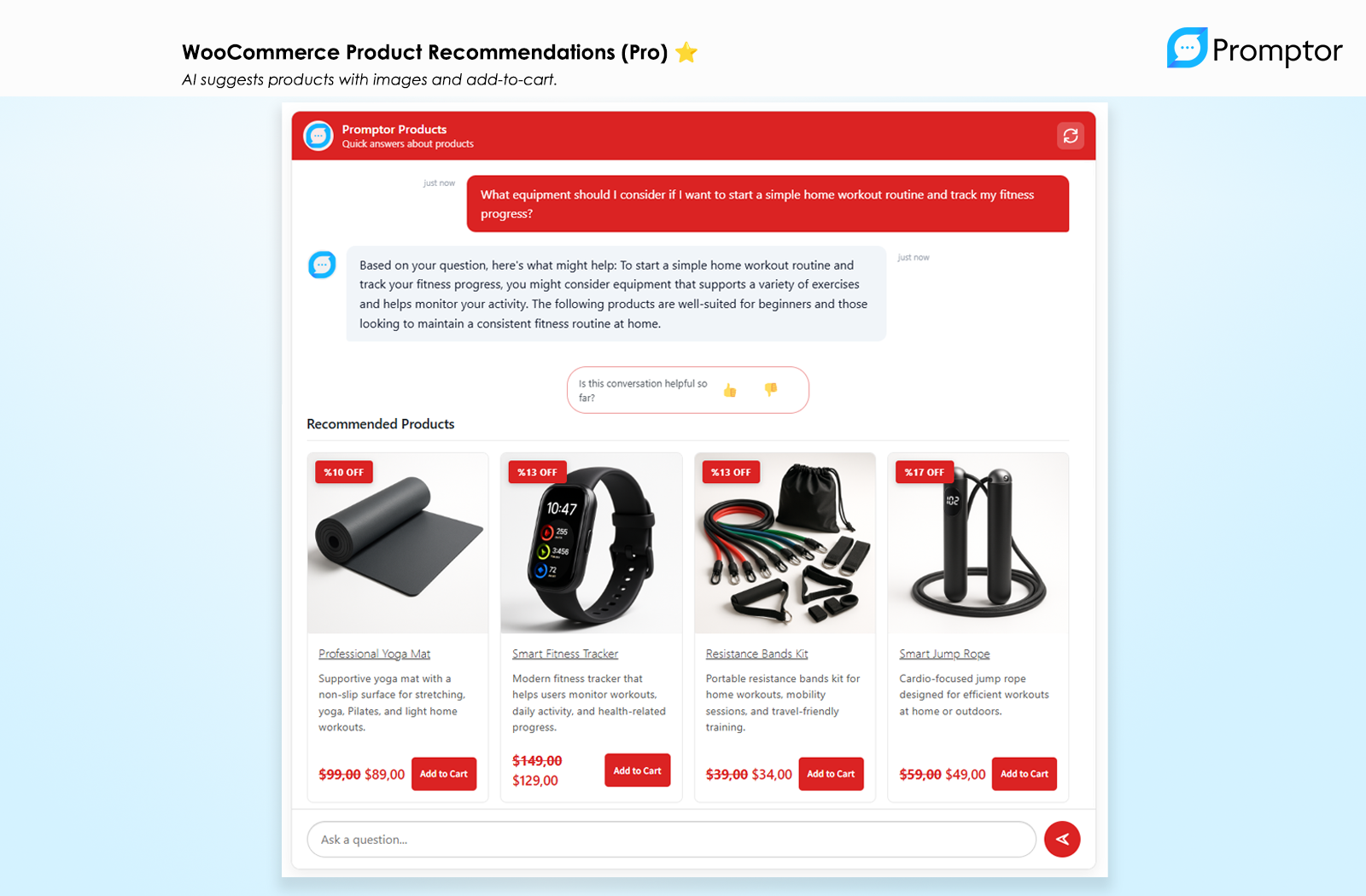
AI Cost Guardrails — Control spending with limits, alerts, and automatic fallback 
(Pro) WooCommerce Product Recommendations — AI suggests products with images and add-to-cart
Installation
Automatic Installation (Recommended)
- Go to Plugins > Add New in your WordPress dashboard
- Search for “Promptor”
- Click “Install Now” then “Activate”
- Follow the setup wizard — choose “Try instantly” for the free trial or enter your OpenAI API key
Manual Installation
- Download the plugin .zip file from WordPress.org
- Go to Plugins > Add New > Upload Plugin
- Choose the .zip file and click “Install Now”
- Activate and follow the setup wizard
First-Time Setup
- Activate the plugin — the setup wizard opens automatically
- Choose “Try Promptor instantly” (no API key) or enter your OpenAI API key
- Select pages to train the AI on
- Add
[promptor_search]to any page or post - Start chatting with your AI assistant
FAQ
-
Do I need an OpenAI API key to use Promptor?
-
No. You can start immediately with the free trial — 10 AI queries, no API key required. The trial lets you select up to 2 pages, train the AI, and test it with your own content. When you’re ready for unlimited use, add your own OpenAI API key in Settings.
-
What happens after the free trial?
-
After 10 queries, the trial ends. Add your OpenAI API key to continue using Promptor with no query limits. Your settings and content selections are preserved.
-
Does the AI use my website content or generic responses?
-
Promptor reads and uses your actual pages and posts. During trial, selected pages are used to generate real answers. With your API key, the full knowledge base is indexed for more accurate responses.
-
How much does the OpenAI API cost?
-
OpenAI charges based on usage. A typical conversation costs $0.01-$0.10 depending on length and model. Promptor includes AI Cost Guardrails to help you set spending limits and control costs.
-
How do I display the chat on my site?
-
Use the shortcode
[promptor_search]on any page or post. Pro also includes a floating popup widget that appears on all pages. -
Does this work with my WordPress theme?
-
Yes. Promptor works with any standard WordPress theme including Astra, Kadence, GeneratePress, Neve, and default themes. CSS isolation prevents style conflicts.
-
How many leads can I capture?
-
Unlimited in both free and Pro versions. Lead capture has no restrictions.
-
What’s the difference between Free and Pro?
-
Free includes AI chat, lead capture, the no-API-key trial, and up to 3 knowledge base items. Pro removes limits and adds WooCommerce integration, analytics, automation, and white-label branding.
-
What languages does Promptor support?
-
The AI automatically responds in the visitor’s language. Admin interface text supports standard WordPress translations (.po/.mo files).
-
Can Promptor replace a contact form?
-
Yes. Many sites use Promptor as a conversational alternative to traditional forms. Visitors ask questions, get instant answers, and share their contact details naturally — resulting in higher engagement and more qualified leads.
-
Why does the free version have telemetry?
-
Telemetry is optional, disabled by default, and only collects anonymous aggregate statistics. It helps us understand which features matter most so we can improve the plugin. You can enable or disable it anytime in Settings > Telemetry.
Reviews


Contributors & Developers
“Promptor” is open source software. The following people have contributed to this plugin.
Contributors
Translate “Promptor” into your language.
Interested in development?
Browse the code, check out the SVN repository, or subscribe to the development log by RSS.
Changelog
1.4.0
Major update: Try AI instantly (no API key required)
Instant AI Trial:
- Start without an OpenAI API key — 10 free queries included
- One-click trial activation in the setup wizard
- Test with your own content immediately
Mini Knowledge Base:
- Select up to 2 pages to train your AI during trial
- Real answers generated from your actual content
- Suggested questions included for instant testing
AI Behavior System:
- Persona and tone controls for AI responses
- Per-knowledge-base behavior overrides
- Live behavior preview in settings
Improved Onboarding:
- Trial-first setup wizard — no API key barrier
- Clear trial status on settings and welcome pages
- Smooth transition to your own API key when ready
- Trial exhaustion messages guide users to add their key
Reliability & Improvements:
- Improved overall stability and WordPress compatibility
- AI now responds in the visitor’s language during trial
- Clearer setup and status messages across the plugin
- Smoother onboarding experience from install to first answer
- Optional anonymous usage insights (opt-in, no personal data)
1.3.5
Release Date: March 17, 2026
New Features (Pro):
* Inventory-Aware AI Recommendations — AI now knows product stock status and prioritizes in-stock items
* Product Comparison Table — Side-by-side comparison table when AI recommends 2+ products
* Stock Badges — “Out of Stock” and “Low Stock” badges on product cards
* Cart Reminder — Nudge visitors to complete purchases when they have items in cart
* WooCommerce Display Settings — Admin controls for comparison, stock badges, and cart reminder
Chat UX Improvements:
* Message Timestamps — Each message now shows a relative time indicator (“2 min ago”, “just now”)
* Copy Message Button — One-click copy icon on AI responses for easy sharing
* Modern Thinking Indicator — Replaced bouncing dots with a sleek “Promptor is thinking…” pulse animation
Accessibility:
* Full Keyboard Navigation — Tab through example questions, arrow keys to navigate, Enter to select
* ARIA Labels — Screen reader support for chat log, input field, send button, and all interactive elements
* Focus Trap — In popup mode, Tab focus stays within the chat widget
* Focus-visible Styles — Clear keyboard focus indicators on all interactive elements
Mobile UX:
* Input Auto-Resize — Textarea automatically grows as you type longer messages (max 120px)
* Consistent Touch Targets — 44px minimum touch target on all buttons and interactive elements
Performance:
* Debounced Input — Prevents unnecessary re-renders during fast typing
Bug Fixes:
* Fixed price display showing raw HTML entities instead of proper currency symbols
Improvements:
* Redesigned comparison table with better spacing, color-coded cells, and star ratings
* Redesigned cart reminder with improved layout and styling
1.3.0
Release Date: March 6, 2026
New Features:
* AI Cost Guardrails — Never worry about surprise API bills again. Set daily and monthly spending limits, receive email alerts at 80%, 90%, and 100% usage, and let the plugin automatically switch to a more affordable model when you approach your budget. Configure everything from the new Settings > AI Usage tab.
* Dark Mode — Work the way you prefer. Choose between Dark, Light, or Auto (follows your system setting) from UI Settings. Every admin page is beautifully styled in both themes.
* (Pro) Branded Email Notifications — All notification emails now feature a professional, branded HTML template with your site name, color-coded headers, and a polished layout that looks great in every email client.
* (Pro) Submissions Archive & Filters — Keep your leads organized with archive/unarchive actions, date range filtering, and score-based filtering (High/Medium/Low). Toggle between Active and Archived views just like your email inbox.
Improvements:
* Refreshed Admin Interface — Every settings page has been polished with consistent styling, clear section icons, and an improved visual hierarchy. The admin area now feels modern and cohesive.
* Modern Toast Notifications — No more jarring browser popups. All admin notifications now appear as sleek, non-intrusive toast messages.
* Smarter Error Messages — When something goes wrong, both you and your visitors see clear, helpful messages instead of cryptic errors.
* Knowledge Base Management — Improved action buttons with helpful tooltips and better layout make managing your knowledge bases easier than ever.
* Under-the-Hood Reliability — Extensive code modernization with 111 automated tests ensures rock-solid stability. Your chat widget is now faster, more reliable, and thoroughly tested.
* Full WordPress Plugin Check compliance for security and coding standards
1.2.2
Release Date: February 12, 2026
New Features:
* Single-screen Setup Wizard – New guided onboarding flow for faster first-time setup, accessible on first activation
Bug Fixes:
* Fixed PHP 8.1 compatibility warnings for a smoother, warning-free experience
* Fixed activation redirect issues that could cause errors on first install
* Fixed potential errors on fresh installs before the database was fully initialized
1.2.1
Release Date: February 3, 2026
New Features:
* Step-Based Onboarding – Guided 3-step setup process for first-time users
* Test Chat Feature – Try your AI assistant with suggested questions after setup
* Optional Anonymous Telemetry – Opt-in usage analytics for free version (disabled by default, no PII)
* WordPress.org Review Prompt – Smart review request that appears only after delivering value
* Modern 3-Column Onboarding Grid – Card-based layout with dismissable progress tracking
Improvements:
* Better First-Time Experience – Reduced distraction during setup with focused UI
* Enhanced Welcome Page – Redesigned with progress tracking and contextual guidance
* Admin Visit Tracking – Enables smart timing for review prompts
* Improved Pro Upsell Timing – Less intrusive, more contextual upgrade messaging
Bug Fixes:
* Frontend UI Settings – Colors and fonts now apply correctly to shortcode widget
* Universal Theme Compatibility – Complete CSS isolation prevents conflicts with Neve, Astra, and all major themes
* Shortcode Display – Free version correctly shows [promptor_search] for default knowledge base
* PluginCheck Compliance – All queries use prepared statements, proper nonce verification, translator comments added
Technical:
* Telemetry Auto-Sync – Existing installations sync current state when telemetry first enabled
* Enhanced CSS Architecture – Theme-proof styling with maximum specificity and explicit element styles
1.2.0
- Improved code quality and WordPress.org compliance
- Enhanced documentation and compatibility
- Performance optimizations
- (Pro) New Lead Scoring System
- (Pro) Webhook Integrations
- (Pro) Diagnostics Panel
1.1.1
- Fixed: Translation system completely rebuilt for reliable multilingual support
- Fixed: All UI text now translates correctly regardless of plugin folder name
- Fixed: “Request Quote” buttons and confirmation dialogs translate properly
- Improved: Faster translation loading with embedded translations
- Improved: Works with Freemius folder renaming
1.1.0
- New: Conversation Memory – Chat history persists across page navigations
- New: “New Conversation” button for clearing chat history
- New: Improved AI responses with clarifying questions and fallback messages
- New: Better empty state handling with clear error messages
- New: (Pro) Most Asked Questions analytics report
- Enhanced: Unified service conversation UI
- Enhanced: Multi-description support for services
- Enhanced: Full-width quote form on desktop
- Enhanced: (Pro) PDF cards with file size and download button
- Improved: Mobile chat experience with smooth animations
- Fixed: Quote form width and duplication issues
- Fixed: (Pro) PDF Files tab visibility in Knowledge Base
1.0.1
- Added: Smart pagination for Knowledge Base content management
- Added: Real-time selection counter and bulk selection tools
- Enhanced: AI-powered example questions generator for multilingual content
- Fixed: Frontend translations now display correctly
- Fixed: Critical – Save preserves previously selected items when using Load More
- Optimized: Better performance with large content libraries
1.0.0
- Initial release
- Core AI Chat powered by OpenAI
- Knowledge Base from Pages, Posts, (Pro) Products & PDFs
- Service and product recommendations
- Built-in lead generation
- (Pro) Performance Dashboard
- (Pro) Advanced Lead Management